

How we built a Slack bot and sped up hiring new specialists
A first-hand account of evaluating interview scheduling approaches and building a Slack bot at Grid Dynamics. It describes the architecture, interface, integrations, and reported results.
Translated by ChatGPT GPT-6.1 Sol

Original publication details
Как мы создали Slack-бот и ускорили процесс найма новых специалистов
Archived publication. Roles, figures, and technical instructions reflect the original publication date.
Hello, everyone! My name is Dmytro Hoi. I work as a Python Software Engineer at Grid Dynamics. In this article, I will explain how we automated the process of hiring new specialists with a Slack bot. This piece will be of interest to developers, hiring managers, recruiters, and everyone directly involved in interviewing candidates. So, let’s begin.
How long does it take to find out when everyone is available? Or, identifying the problem
Hiring new people for a company is a fairly labor-intensive and time-consuming process. It involves a recruiter, a candidate, and the company’s technical specialists, who assess the applicant’s knowledge.
Broadly speaking, hiring can be divided into the stages a candidate goes through from submitting a résumé to the final decision. Before a technical interview, the three parties mentioned above need to agree on a time. The recruiter acts as a mediator at this stage and during the interview itself.
To make the scale of the situation clearer, let’s look at the numbers. In our local offices, we have more than 40 people on the recruiting team and around 700 engineers willing to participate in technical interviews. The Slack bot’s main task was to optimize communication between recruiters and interviewers to identify time slots that work best for both the interviewers and the candidate.
Coordination is difficult because technical specialists have their own tasks and a limited amount of free time. Available time slots are not always obvious and rarely come without the two parties agreeing directly. As a result, a recruiter has to do many things: select suitable specialists for a technical interview, compile a list, and send a written request to each potential interviewer to find a convenient time matching the candidate’s wishes. Needless to say, all this happens during working hours, when an interviewer’s response can take anywhere from a few minutes to several hours. Thus, the speed of finding a meeting time depends heavily on the interviewer’s availability when the request arrives, as well as the candidate’s availability.
With this in mind, let’s identify several tasks we needed to solve:
-
Find suitable interviewers quickly and easily.
-
Easily identify available specialists willing to conduct an interview.
-
Notify the interviewer about an upcoming meeting with minimal expenditure of the recruiter’s time.
-
Optimize communication with specialists to free up time for ongoing tasks.
What if we brought everyone willing to help together? Or, concentrating requests in a chat
In our case, the first solution toward optimizing this stage was to concentrate the pool of interviewers and the requests in one communication channel. Simply collecting the necessary interview parameters from the recruiter in a communication channel, such as a Slack chat, eliminated duplicate requests in direct messages. It allowed specialists more flexibility in choosing when to respond and assessing how well requests matched their capabilities. Fortunately, the corporate messenger has a feature for organizing specific Workflows, which make it possible to see whether individual requests are still relevant and automate responses to them a little. However, this does not fully solve the task: it is still impossible to determine whether a specialist is available during the required time without involving them and distracting them from their current work, because every interviewer has to read every request in the chat to understand whether they can take part.
This leads to not everyone reading the chat, bringing us back to the original task. To distribute requests by relevance, we also need to remember to create not just one chat but a whole group of them, covering at least different disciplines and thereby reducing the information load on each specialist.
Implementation tools:
-
Slack chat
-
Slack Workflows
Advantages of the solution:
-
Responsibility for identifying a suitable interviewer is handed to the specialists themselves. Each responds to a request independently and understands their possible role in the meeting.
-
Less time spent communicating and waiting for responses between participants.
-
Notification of the upcoming meeting is implicitly covered for a specialist who independently accepts the request.
-
Easy to organize using existing tools.
Disadvantages:
-
Slow responses to requests because specialists feel less responsibility than they do when approached personally.
-
Requests that are not always relevant add to their information load while they carry out current tasks.
-
It does not reveal the total number of potential interviewers for each request.
Booking time through survey forms and building an availability database
The second way to achieve our goals was to collect information about interviewers’ availability for a certain period in advance and build a database containing it. Solving the task this way required not only instructions on how interviewers should fill out this information correctly, but also training the recruitment team to use the data. With a scheme in which a specialist specifies time slots when they could participate in a meeting and a recruiter books their time for a particular event, we still do not solve the problem completely. It also adds a burden for all parties, both in time spent working with this approach—for example, a spreadsheet—and in additional coordination and mechanics: marking bookings, availability, schedule changes, and so on.
Implementation tools:
- Online spreadsheets
Advantages of the solution:
-
Faster communication about the meeting time.
-
Interviewers declare their possible time slots.
Disadvantages of the solution:
-
Additional actions for specialists as part of their weekly tasks.
-
Difficulty identifying suitable specialists because of additional data matching in spreadsheets.
-
No way to notify an interviewer about upcoming commitments without contacting them directly.
-
Greater difficulty filtering and updating information when working with spreadsheets.
-
Possible overlaps in requests and communication between different recruiters and interviewers.
An automated assistant for coordinating interview times
This option incorporated all the advantages of the previous options thanks to the possibility of implementing it as a Slack application. First of all, using an automated assistant—or, more simply, a bot—we can construct a sequence of actions for all participants that avoids differences in interpreting the approaches or instructions of previous implementations. By normalizing and defining the data nesting and database organization we need, we also simplify working with the data itself, providing each user with a particular interaction interface.
Implementation tools:
-
A Slack application
-
A server running the bot
-
A database
Advantages of the solution:
-
Interviewers independently manage suitable times.
-
Automated reminders about the specified times.
-
Convenient search for a suitable specialist by the required parameters and date.
-
Controlled resolution of conflicts when booking time slots.
-
Automatic notification of time bookings.
-
Control over data at every interaction step.
-
Communication between participants reduced to the necessary minimum.
Disadvantages of the solution:
-
Managing and maintaining the bot ourselves.
-
Finding interface solutions that work universally for most users.
-
A single process that may not be flexible enough for all technical specialists.
Implementing the bot
In the search for a solution, each of the proposed options was implemented and tried. The remainder of this article describes the bot’s implementation as the solution best suited to our needs.
We chose the following set of technologies to implement the bot:
-
Python 3.10—the current version of a programming language that is quick to write in, very widespread, and has a large developer community and many libraries for implementing our idea.
-
Slack Bolt—the official library for working with Slack applications, available in Python.
-
Boto3—the official library for working with AWS, needed in our case to interact with the DynamoDB database, available in Python.
-
Google API client—the official library for working with Google APIs, used for Google Calendar and allowing interaction with specialists’ calendars in Google Workspace, available in Python.
-
APScheduler—an open-source library that allows automatic execution of specified code to be scheduled at a given time or interval, with given parameters.
We also wrote additional basic functions to improve code quality and runtime stability. In my view, this is what is missing for more “pythonic” work with the Slack API.
For example, when retrieving user information, we receive a dictionary that can only be accessed through a string key. For this case, we wrote functions that parse the returned information and provide exactly the data requested.
The bot’s infrastructure looks like this:
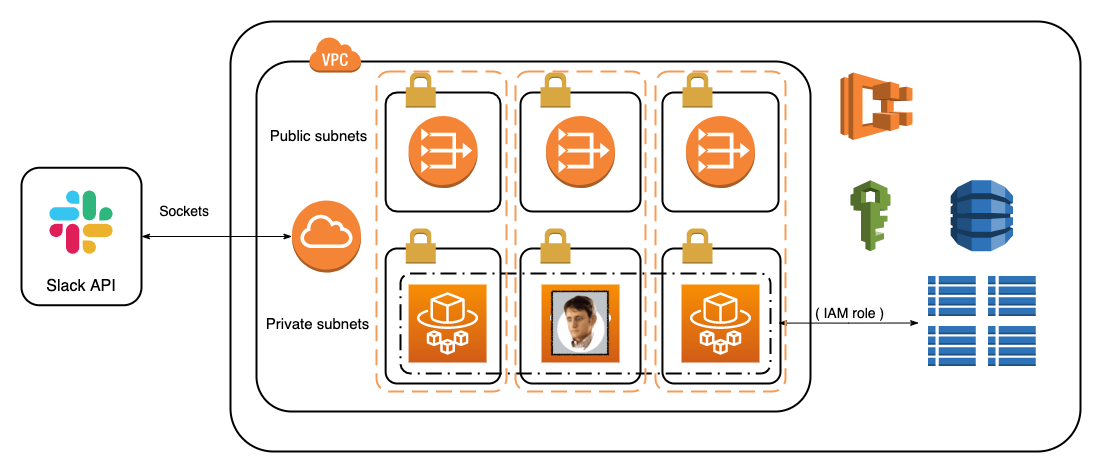
We also wrote a small ORM (object relationship model), which allows more flexible, higher-quality work with the data stored in the database. Here, too, we move away from associative arrays in favor of objects. Unfortunately, we did not find a suitable ready-made solution for working with DynamoDB.
The project consists of several parts:
-
handlers—contain classes used to catch events from interactions with the bot;
-
services—classes responsible for interacting with third-party services;
-
database—classes for working with the database;
-
middlewares—allow requests to be processed through the context before they are sent to a handler;
-
blocks—reusable universal blocks and buttons used in handlers;
-
utils—necessary helper classes for working with time zones, message broadcasts, and time slots.
As for configuring the application itself in Slack, we only needed permission to send messages to users, permission to display the Home tab, and the ability to look up information in the Workspace to make mapping bot users to information stored by Slack more convenient.
In the new application settings interface, Slack allows you to work directly with manifest.json to configure your applications. This was very helpful for expanding permissions later—for example, to let the bot share production error and bug logs in real time as report files.
The most convenient way to interact with the bot turned out to be displaying modal windows, which can hold up to 100 information blocks. It is particularly nice that these windows can support submission and contain input blocks, both selectors and text fields. Buttons are also convenient: they directly help us work with data associated with the information shown in a block.
For example, below we see the selected time slots when an interviewer can interview a candidate:
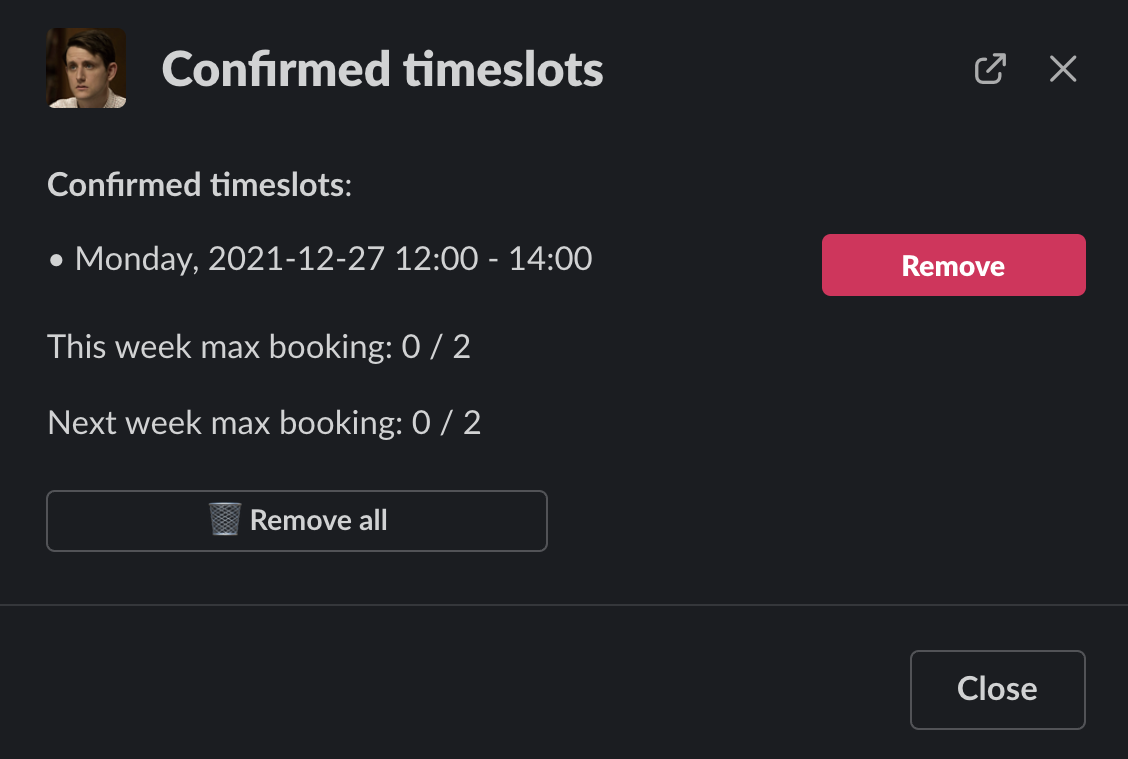
Accordingly, we can withdraw that time using its associated button. There is also a button for deleting all selected time slots.
The main interaction point is the interviewer search form. In this window, we choose the parameters we need for an interview and, based on the data entered, receive information about our specialists’ availability to participate in the meeting.
It looks like this:
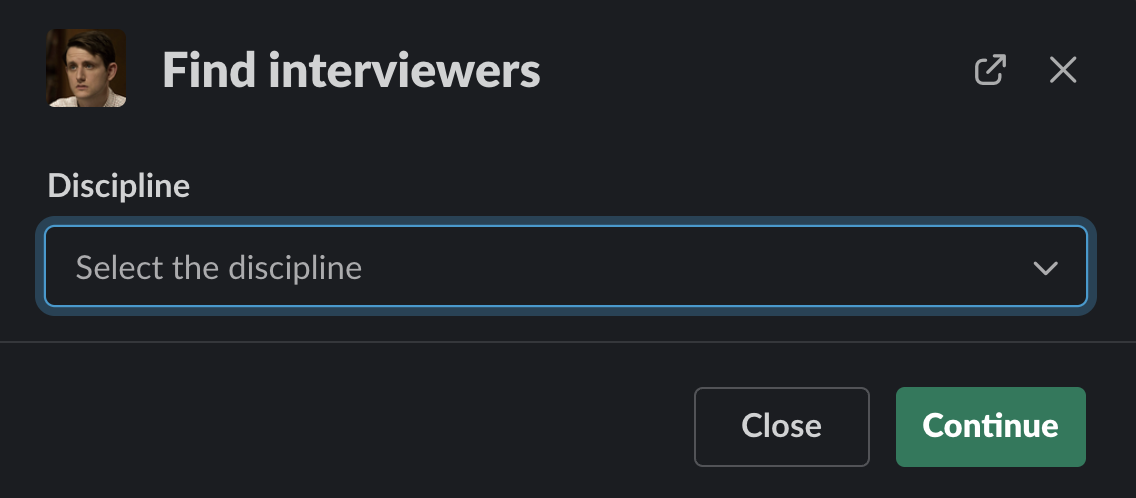
First, we choose the discipline for which we need to find an interviewer.
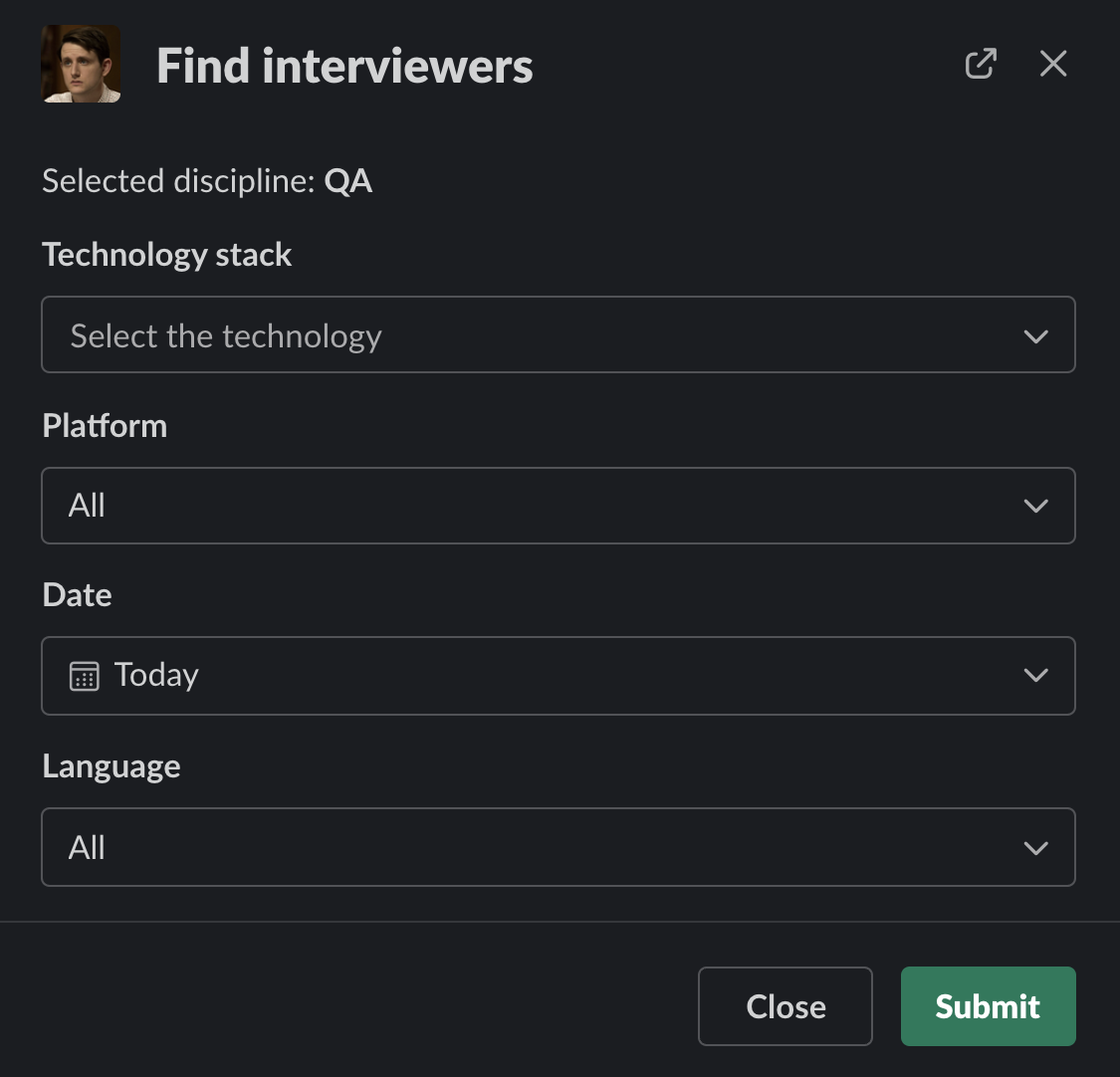
Then we choose the specialist parameters we need. Important items are the technology used to determine who can interview the candidate, and a date convenient for both the specialist and the candidate.
Splitting this into two separate windows that open in sequence is necessary to retrieve technologies and platforms relevant to the discipline we need. These two selectors take their values from a constant describing how disciplines relate to these items, using the ability to retrieve external data when values are requested for a selector (selector with external data). The initial implementation did not require additionally storing these relationships in the database. In the future, using this element makes it possible to retrieve the data from such tables. The windows themselves know about previously selected values through the metadata parameter, which stores them as a text string.
The Slack bot has the following functionality:
-
Collecting and processing statistical data to provide management with useful information and analytics.
-
Creating and managing interviewer information by bot administrators, and granting company management representatives—for example, discipline leads—permission to work with it.
-
Displaying database information to the users described there and allowing users to configure certain parameters.
-
Sending messages and notifications to all user groups, both automatically and at administrators’ request.
-
Processing and displaying error information.
-
Integrating with Google Calendar to identify times interviewers can use to attend meetings, and to save a placeholder directly in the interviewer’s calendar.
-
Marking time slots that already have confirmations from interviewers with similar parameters.
Let us also highlight important aspects of working with a Slack Application:
-
A modal window must be opened within 3 seconds. To get around this restriction, we chose an approach that opens a “waiting window” containing appropriate text, then updates it with the data, for example after retrieving it from the database.
-
The application must respond to Slack within 15 seconds to say the request has been processed. The Acknowledge function from Slack Bolt is used for this response, and the approach described in the previous point also helped us get around this restriction for long or multiple database queries. For example, when validating submitted data, displaying an error directly next to the erroneous field can take longer than expected.
-
To preserve data for the user, we need to send a message containing the results of certain operations. This also gave us an additional history of user actions for retrieving useful information during debugging.
-
The blocks used to build the interface can be used in modal windows, in messages, and on the Home tab. This helps construct flexible interfaces. In our implementation, we also use this capability to display a message intended for broadcasting to users. That way, bot administrators see how the message will look to users.
-
Native confirmation of user actions (confirm object). This built-in interface element can be attached to almost any user interaction. It displays additional information explaining an action’s consequences and provides another level of confirmation—for example, what will happen and how the bot will interpret changing a field or pressing a button.
As for Slack Bolt itself, one important aspect is the ability to create interfaces using instances of classes for various blocks. The library also allows dictionaries (dict) to define block information, but this approach is not very effective either during development or for debugging. Using the library’s built-in classes also helped eliminate validation problems on Slack’s side. Another key feature is the ability to use various built-in options for receiving events and interacting with Slack servers. Naturally, we chose interaction through sockets for our bot.
Where do we go next? Or, the conclusion
As a result, over 4 months, all our interviewers were added to the database to work with the bot. During that time, several variants of time slots were used, developed directly from user suggestions.
Both recruiters and interviewers noted the practical benefit of using the bot. We can also see it in the numbers for the last month:
-
2600 time slots confirmed;
-
550 booked by recruiters;
-
more than 1000 search queries made through the bot.
And over the entire period of operation:
-
more than 750 time slots generated for production;
-
7 bots created in the staging environment to work toward the final result;
-
12 releases with functionality deployed;
-
4 time zones supported in working with the bot, with another 5 on the way (USA).
How will the Slack bot develop next? There are many ideas, but one of the first tasks is using it company-wide: adding all interviewers and all the disciplines we can cover. This requires adding people from offices in other parts of the world. Work has also begun on integrating with other company services to increase automation of hiring processes. Plans have also already been outlined for an API that would let the bot perform particular actions at the request of other services.
I invite anyone interested to discuss corporate bots and Slack bot development in the comments. It would be interesting to read your suggestions for what to cover next: corporate bots and their use in large companies, Slack bots, or aspects of their development.